Installation
OKDay supports installation on Windows, macOS, and Linux.
MacOS
We currently offer two versions(Arm64, x64), and the specific choice depends on the processor architecture of your macOS.
Which version should I download for Mac?
Arm64: Mainly for Apple silicon. If you have an Apple silicon, Arm64 is the best choice, with a smaller package size and faster performance.x64: Mainly for Intel Chips. If you have an Intel chip, x64 is the best choice, with a smaller package size and faster performance. The Arm64 package cannot run on Intel chips.
Determine what chip it is: Apple or Intel?
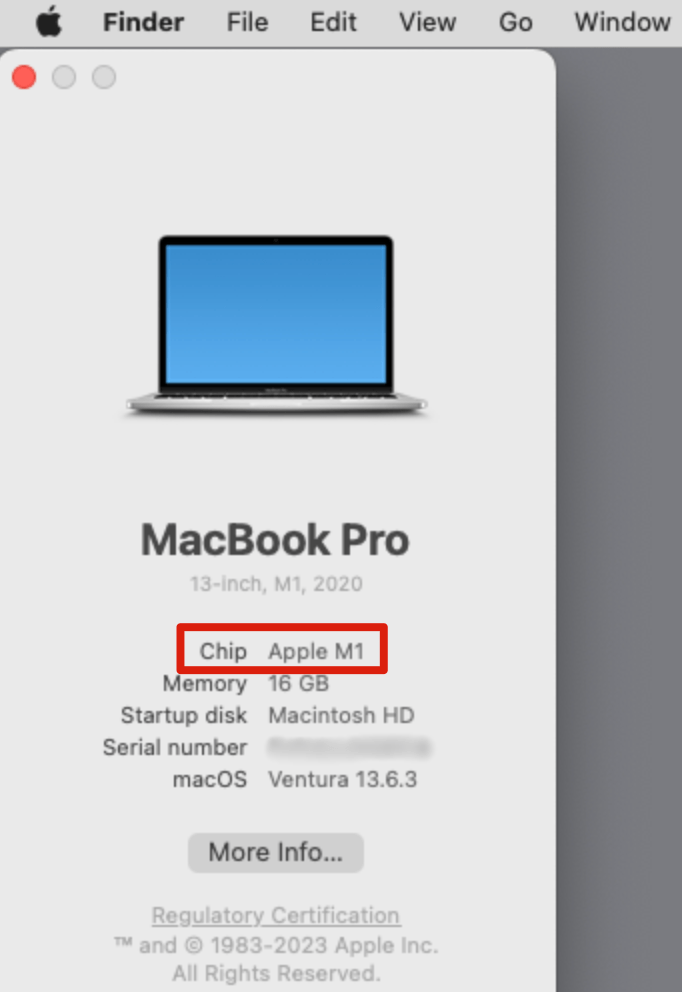
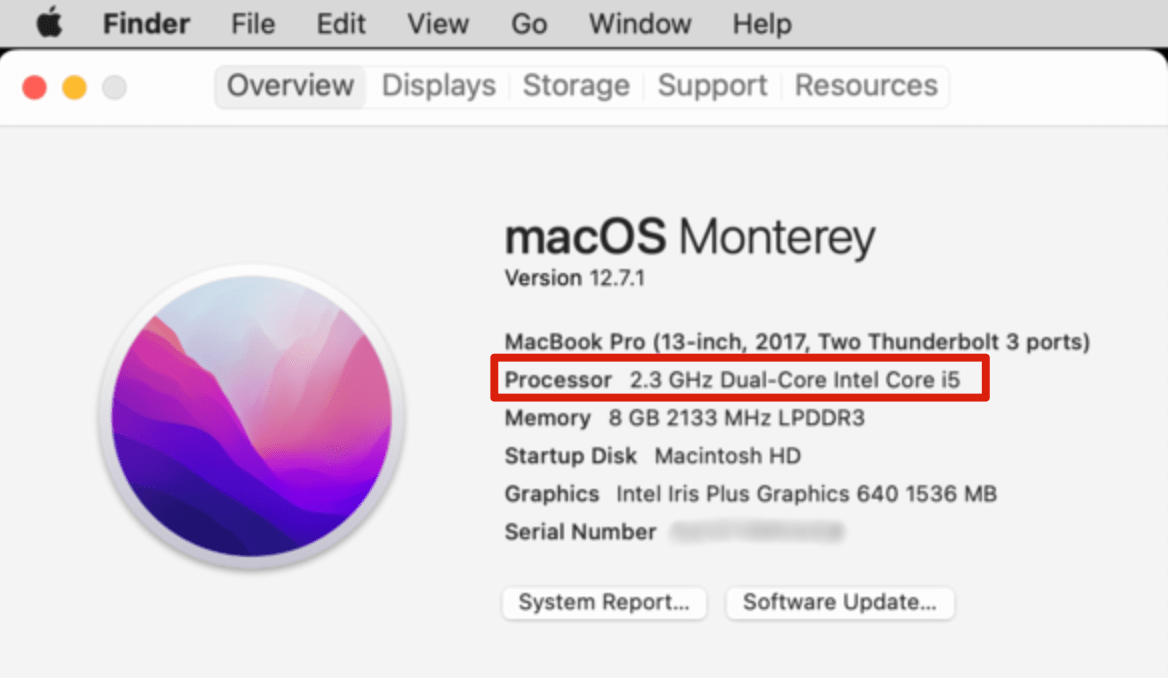
Click the Apple icon on the menu bar at the top-left corner of your screen Select About this Mac. The type of chip used on your Mac is displayed in this window.
Apple silicon(Arm64):
Intel chip(x64):
Windows
We currently offer the x64 version and support Windows7 and above.
On Windows, you will download Setup.exe and simply follow the instructions to install.
Which version should I download for Windows?
We offer two versions:
- x64: For 64-bit Windows systems with x64-based processors.
- arm64: For 64-bit Windows systems with ARM-based processors.
For the vast majority of users, the x64 version should be selected. This version supports all Windows systems from Windows 7 and above.
Only a small number of the latest Win10 or Win11 systems based on ARM64 need to consider the ARM64 version.
How to Check Your Windows System Architecture?
-
Open Settings:
- Click on the Start menu.
- Select Settings (the gear icon).
-
Navigate to System Information:
- In the Settings window, click on System.
- Scroll down and select About from the left-hand sidebar.
-
Check System Specifications:
- Look for the System type under the Device specifications section.
- It will indicate whether your system is a 64-bit operating system, x64-based processor or 64-bit operating system, ARM-based processor.
-
Choosing the Correct Version:
- If your system type is "64-bit operating system, x64-based processor", Choose the x64 architecture version.
- If your system type is "64-bit operating system, ARM-based processor", Choose the arm64 architecture version.
Linux
We currently offer deb formats, supporting x64 and arm64 architectures.
Which version should I download for Linux?
We currently offer deb formats, supporting x64 and arm64 architectures:
- x64: Packaged as a Debian package for 64-bit x86 systems.
- arm64: Packaged as a Debian package for 64-bit ARM systems.
For the vast majority of users, the x64 version should be selected.
Only a small number of the latest systems based on ARM64 need to consider the ARM64 version.
How to Check Your Linux System Architecture?:
- Open a terminal.
- Enter the command
uname -mto determine your system's architecture. - If it returns
x86_64, you have a 64-bit x86 system. - If it returns
aarch64, you have a 64-bit ARM system.